Best video games and PC Gaming Store in Jordan

  • +962 6 5511104 / +962 6 5511105
  • info@igeekjo.com
  • Store Locator
  • Currencies
    • JOD
    L/A
    • en
  • Sign in or Register
iGeek Megastore
  • 0
No result found for your search.
  • Home
  • Gaming Accessories
  • Fifine Ampligame V3 Capture Card Records 1080p/60 Fifine Ampligame V3 Capture Card Records 1080p/60
Categories
  • Video Games
  • Monitors
  • Laptops
  • PC Components
  • Gaming Accessories
  • Mobile Phones
  • Accessories
  • Collectables
    • Action Figures
    • POP! Funko
    • Amiibo
  • Printers
  • Simulators
    • Racing
    • Flight
    • VR
  • Virtual Reality (VR)
Latest Products
TP-LINK LS1024G 24-Port Gigabit Desktop/Rackmount Switch
59 JOD
TP-LINK LS1016G 16-Port Gigabit Desktop/Rackmount Switch
45 JOD
TP-LINK TL-SG105S-M2 5-Port 2.5G Multi-Gigabit Desktop Switch
49 JOD
TP-LINK LS1005G 5-Port 10/100/1000Mbps Desktop Switch
12 JOD
TP-LINK TL-SG1008D 8-Port Gigabit Desktop Switch
19 JOD
TP-LINK TL-SG1005D 5-Port Gigabit Desktop Switch
15 JOD
MERCUSYS N150 WIRELESS NANO USB ADAPTER
5 JOD
TP-LINK Archer T2U Nano AC600 Nano Wireless USB Adapter
12 JOD
  • electro-track-order-icon
  • Free Delivery
    For Orders Over 200JD
  • electro-thumb
  • 99% Customers
    Feedbacks
  • electro-return-icon
  • Warranty
    Is Real
  • electro-payment
  • Payment
    Secure System
  • electro-brands-icon
  • Only Best
    Brands
% -59 JOD
Fifine Ampligame V3 Capture Card Records 1080p/60

Fifine Ampligame V3 Capture Card Records 1080p/60

Brand: Igeek Megastore
  • Share
  • Tweet
Product SKU: FIFINE-V3
Available:
Only -1 item in stock
-1 item in stock
In stock
Pre-order
Out of stock
59 JOD
 
Notify me When Available
You will receive an email when the product is available.
  • Description
  • Shipping & Returns
  • Reviews

You can capture your gameplay on Play Station or Xbox through APPs on PCs, but the laggy image or audio is definitely something you should be prepared to worry about. Not just console gamers or Twitch streamers need to capture signals from another source, but also those who have many Zoom meetings to run or attend and want better than webcam image quality from their cameras. You can also find those settings for some brands, but it’s not the feature available to everyone out there. There’s always restriction when you want to cut some corners.

Then why not consider something that just paves the path of capturing for you? Not the fancy capture cards that cause you an arm or a leg, especially if you’re not running all your content in 4K on every platform. Here comes the 1080P/120Hz pass-through and 1080P/60Hz record FIFINE AmpliGame V3.


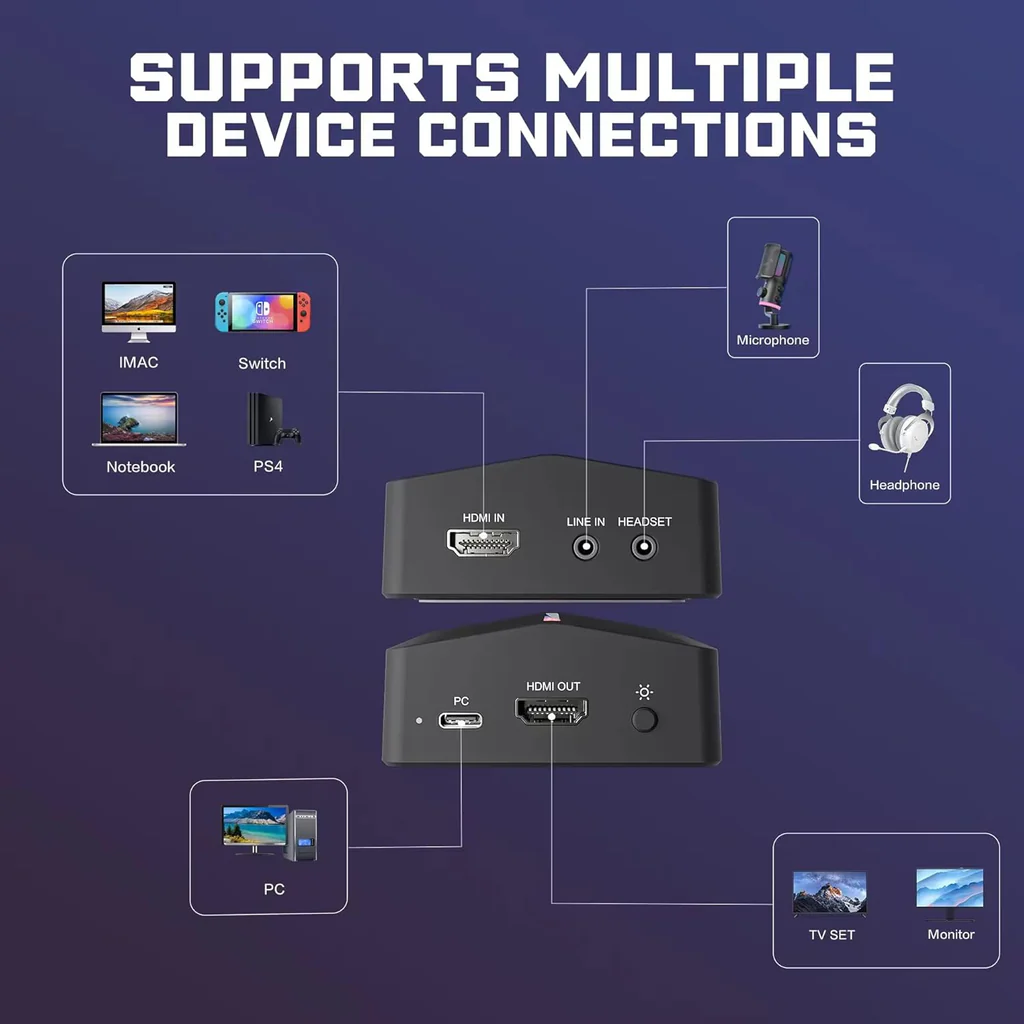
Unlike the camlink type of capture cards that have only one input and one output, this one adds an additional out for you to do more. But it adds no complexity at all since it’s still the same HDMI out from the source to the HDMI in on this card and the signal is recorded through the USB 3.0 connected to your laptop or streaming PC, but with an extra HDMI out pass-through channel connected to a monitor for the preview.

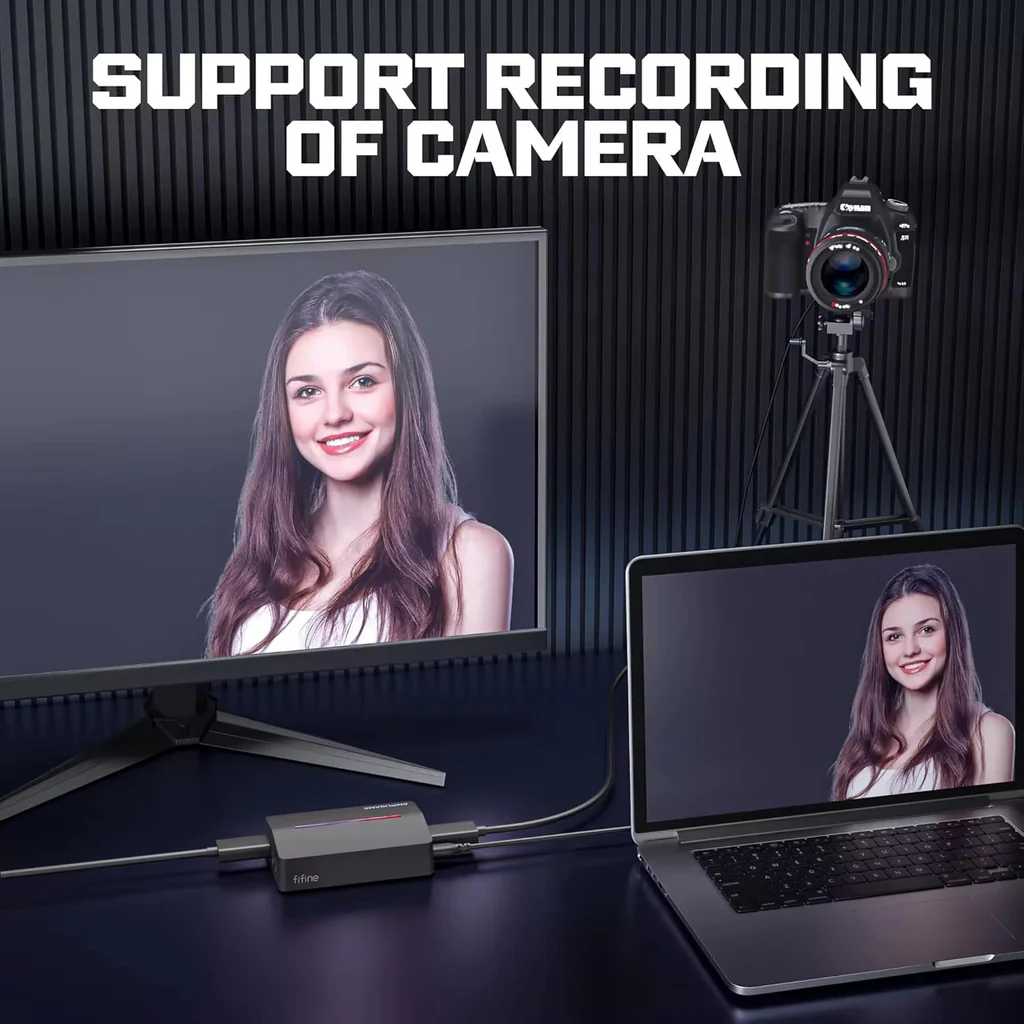
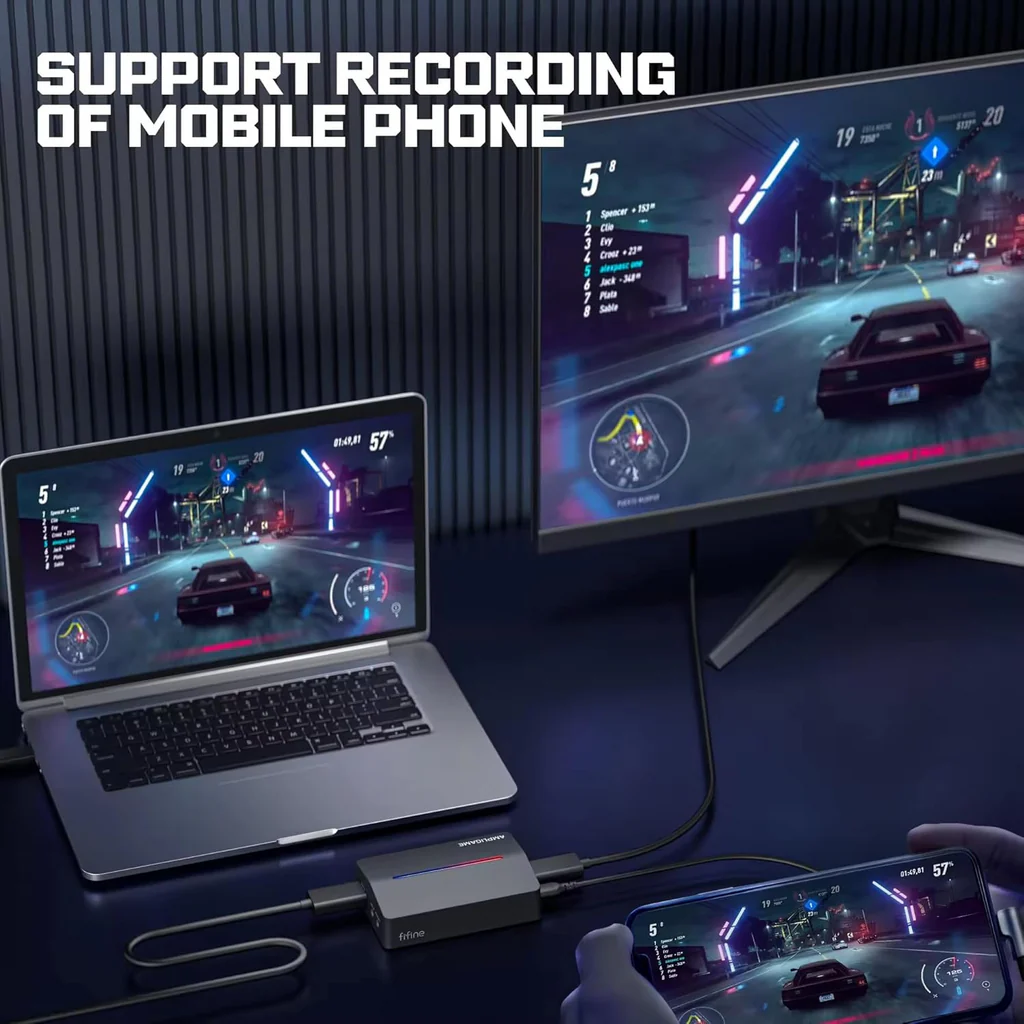
Because of the flexibility of multiple I/O, it isn’t limited to the connection with just consoles, computers, and monitors, it can be hooked up to your cameras for the filming footage, or with your Android or iPad for the mobile gameplay.         

For example, when running a podcast live show, it allows you to send the camera signal to both your Macbook running YouTube live and to another source, like a confidence monitor. 

For gamers, the HDMI output can be used to bring in your console to a monitor that you’re watching your instant game on while the USB 3.0 out is recording separately on your streaming PC.

It doesn’t seem to have to make a point of it, but with only one output, you have to play from the preview of some streaming software like OBS. Yet even the fastest card is still one frame behind, chances are that you’re likely to throw off the aim in FPS games in some cases. For the sake of the most accurate maneuver in the game possible, get the ones with a second output to have the lag-free pass-through to your TV.            


The pass-through supports up to 4K but with a refresh rate of 30Hz. So this resolution isn’t built for games at least in the case of this V3, but it’s best fits for some in-the-frame applications, like a video podcast or a live tutorial in which you use it with a display to monitor the image or color of your high quality DSLR or mirrorless camera.       

For competitive games, it’s a bit different story. Though it’s hard to say no to the 4K image quality, if the gears aren’t up for that standard, it’s just better to set the resolution of pass-through to a sweet spot at 1440P or 1080P to have at least 60Hz or 120Hz refresh rate. Though without HDR, you get pretty good quality and smooth passed-through signal without jitteriness.                          

I/O aside, what pops into your eyes should be the controllable RGB stripe at the top, but it isn’t even close to the importance of what the almost unnoticeable LED indicator on the side stands for. It’s not just the power light, but the HDCP warning. For Play Station streaming, you can turn off the HDCP protection under the HDMI setting of the system. Then clicking open OBS or Stream Labs software, the indicator will turn solid blue. If it’s yellow light on, you can still crack the HDCP by using tools to long press the button inside the headset jack. 

Without being built into your case, one of the redeeming features is flexibility. What reinforces it is the dongle part that doesn’t have to use a USB extender in case the card’s body itself may block some of the other ports.


Recording footage in 1080P/60 Hz at max sounds barely enough, but the resolution doesn’t tell the whole story in some cases, color quality also plays the part. And with the recording resolution down to 480P, you can stream from the latest game to the retro one.

The image in 1080P is inevitable to be a bit softer compared to higher resolution. But the footage recorded by this AmpliGame V3, you’re not going to catch out noticeable additional noises and glitches, thus getting pretty clean feed for the capture channel. And there’s no washed-out color, neither over-boosted contrast. It doe a decent job at handling gradients, resulting in the accurate coloration of the image.  

The recording latency is around the same 65 milliseconds of Cam Link 4K, which is basically a no-no to play games on OBS preview, but it makes no difficulties to sync up for video calling, or no noticeable delay to do conferencing on preview if you don’t have another monitor to deploy.


Specifications

Record Resolution 1920*1080 (Full HD)/60Hz
Pass-through Resolution

3840*2160 (4K)/30Hz
2560*1440 (2K)/60Hz
2560*1440 (2K)/30Hz
1920*1080 (Full HD)/120Hz
1920*1080 (Full HD)/60Hz
480P

Input HDMI
Output

HDMI
USB Type-A 3.0

Latency Lag-free passthrough
60-70ms record lag
Shipping Weight 0.6 kg

iGeek Megastore – Refund and Return Policy

At iGeek Megastore, we strive to offer a seamless shopping experience, providing top-tier gaming products and accessories. We understand that sometimes a purchase might not meet your expectations, and our return policy is designed to ensure your satisfaction.

We offer store credit on eligible returns, allowing you the flexibility to choose another product from our vast catalog.

1. Return Eligibility

You may return your item within 7 days of receipt. To qualify for a return:

  • The product must be unused, undamaged, and in the original packaging with all accessories and tags intact.
  • Proof of purchase from iGeek Megastore is required (e.g., order confirmation or invoice).

2. Store Credit Policy

  • Once the returned item has been inspected and approved, we will issue a store credit matching the item's purchase value.
  • Store credit will be processed within 5 business days from the approval date.
  • This credit can be used for any future purchase at iGeek Megastore and does not expire, providing you flexibility for your next purchase.

3. Non-Returnable Products

For reasons of safety, quality assurance, and customization, certain items cannot be returned:

  • Digital products (such as downloadable software and in-game content)
  • Personalized or custom-made items
  • Items on clearance or final sale
  • Gift cards and vouchers

4. Damaged or Defective Products

In the rare event that an item arrives damaged or defective, please contact us within 48 hours of receiving your order. Our customer support team will promptly arrange for a replacement or store credit equal to the value of the item.

  • Include photos of the damaged or defective product to help us process your request quickly.

5. Return Shipping Guidelines

  • Customers are responsible for the shipping costs associated with returning the item unless the return is due to an error on our part (damaged, defective, or incorrect product).
  • Shipping fees are non-refundable, and in some cases, the return shipping cost may be deducted from the final store credit amount.

6. How to Initiate a Return

Initiating a return is simple. Contact our Customer Care Team via:

  • Email: igeekmegastore@gmail.com
  • Phone: +962 79 5911 007

Include your order number, details of the product you wish to return, and the reason for the return. Our support team will guide you through the next steps.

7. Why Shop with iGeek Megastore?

At iGeek Megastore, we are passionate about gaming and geek culture. Our curated selection includes the latest gaming monitors, controllers, desks, and other cutting-edge technology. Our mission is to provide our customers with products that enhance their gaming experience, backed by responsive customer support and a flexible return policy.

We believe in transparency and aim to provide a hassle-free return experience. Our store credit policy ensures that you have options when making another purchase, and we’re here to help you find the perfect product for your needs.

Related products

Machenike Raid68 Wired Keyboard Magnet Grey Switch RGB BLACK

Machenike Raid68 Wired Keyboard Magnet Grey Switch RGB BLACK Machenike Raid68 Wired Keyboard Magnet Grey Switch RGB BLACK
35 JOD

Machenike L7 Air Tri-mode 1K Gaming Mouse

Machenike L7 Air Tri-mode 1K Gaming Mouse Machenike L7 Air Tri-mode 1K Gaming Mouse
25 JOD
Select Options

MACHENIKE L8 MAX TRI-MODE GAMING MOUSE

MACHENIKE L8 MAX TRI-MODE GAMING MOUSE MACHENIKE L8 MAX TRI-MODE GAMING MOUSE
35 JOD
Select Options

Machenike K500-M61 Wired Magnetic Linear Switch RGB Blackpink

Machenike K500-M61 Wired Magnetic Linear Switch RGB Blackpink Machenike K500-M61 Wired Magnetic Linear Switch RGB Blackpink
29 JOD

Marvo ch-178 Gaming Chair - Black & Grey

Marvo ch-178 Gaming Chair - Black & Grey Marvo ch-178 Gaming Chair - Black & Grey
22%
139 JOD
179 JOD

AWW GAMING CHAIR MULTICOLOR

AWW GAMING CHAIR MULTICOLOR AWW GAMING CHAIR MULTICOLOR
38%
49 JOD
79 JOD
Select Options

LOGITECK G915X LIGHTSPEED LOW PROFILE GAMING KEYBOARD - BLACK

LOGITECK G915X LIGHTSPEED LOW PROFILE GAMING KEYBOARD - BLACK LOGITECK G915X LIGHTSPEED LOW PROFILE GAMING KEYBOARD - BLACK
179 JOD

FANTECH GC284 NEOARC GAMING CHAIR

FANTECH GC284 NEOARC GAMING CHAIR FANTECH GC284 NEOARC GAMING CHAIR
179 JOD
Select Options

DXRacer P132 Gaming Chair - Black/Red

DXRacer P132 Gaming Chair - Black/Red DXRacer P132 Gaming Chair - Black/Red
149 JOD

Redragon K641 SHACO PRO 65% Aluminum RGB Gaming Keyboard

Redragon K641 SHACO PRO 65% Aluminum RGB Gaming Keyboard Redragon K641 SHACO PRO 65% Aluminum RGB Gaming Keyboard
49 JOD
iGeek Megastore

Information

  • Terms & Conditions
  • Refund & Return Policy
  • Privacy Policy

Find fast

  • Home
  • Gift Cards
  • Services
  • News Blog

Customer service

  • Contact Us
  • About Us
iGeek Megastore
  • Terms & Conditions
  • Refund & Return Policy
  • Privacy Policy
  • Home
  • Gift Cards
  • Services
  • News Blog
  • Contact Us
  • About Us
Visa Mastercard PayPal Apple Pay Google Pay
© 2026 iGeek Megastore. All Rights Reserved
    Product successfully added to your Shopping Cart
    Continue shopping View cart